I volunteer at a hiking club that has been around for about 150 years, with a large and constantly rotating group of volunteers. Those volunteers regularly need to understand the latest policies on participant screening, trip posting, safety requirements, and other guidance that has accumulated over decades. While this information exists, it is spread across multiple websites and documents, making it difficult to search, easy to overlook, and hard to know whether what you are reading is still current or authoritative.
A retrieval-augmented generation system is well suited to this problem because it is designed to surface and explain existing information rather than invent new answers. By searching approved policy sources, retrieving the most relevant and up to date sections, and presenting them in clear plain language with links back to the original material, the system gives volunteers fast and trustworthy guidance while preserving accuracy and accountability.
This approach bridges the gap between static documents and natural conversation, turning scattered policy pages into something volunteers can easily use. The Rails app I built to solve this problem implements this as a full RAG pipeline, allowing PDFs and web content to be indexed, embedded, and queried through a ChatGPT-like conversational interface with citations.
Ok, lets get into how I designed it.
The Stack I Chose
- Rails 8.1.1 with Ruby 3.3.5
- Tailwind 4 for styling
- PostgreSQL + pgvector for vector similarity search
- Solid Queue/Cache/Cable — no Redis required
- Cloudflare R2 for document storage (S3-compatible via Active Storage. Clouflare R2 does not charge for data egress which is perfect for a RAG application like this!)
- Voyage AI for embeddings (
voyage-3, 1024 dimensions) - OpenAI for chat completion (gpt-4o-mini via
ruby_llm)
Document Pipeline
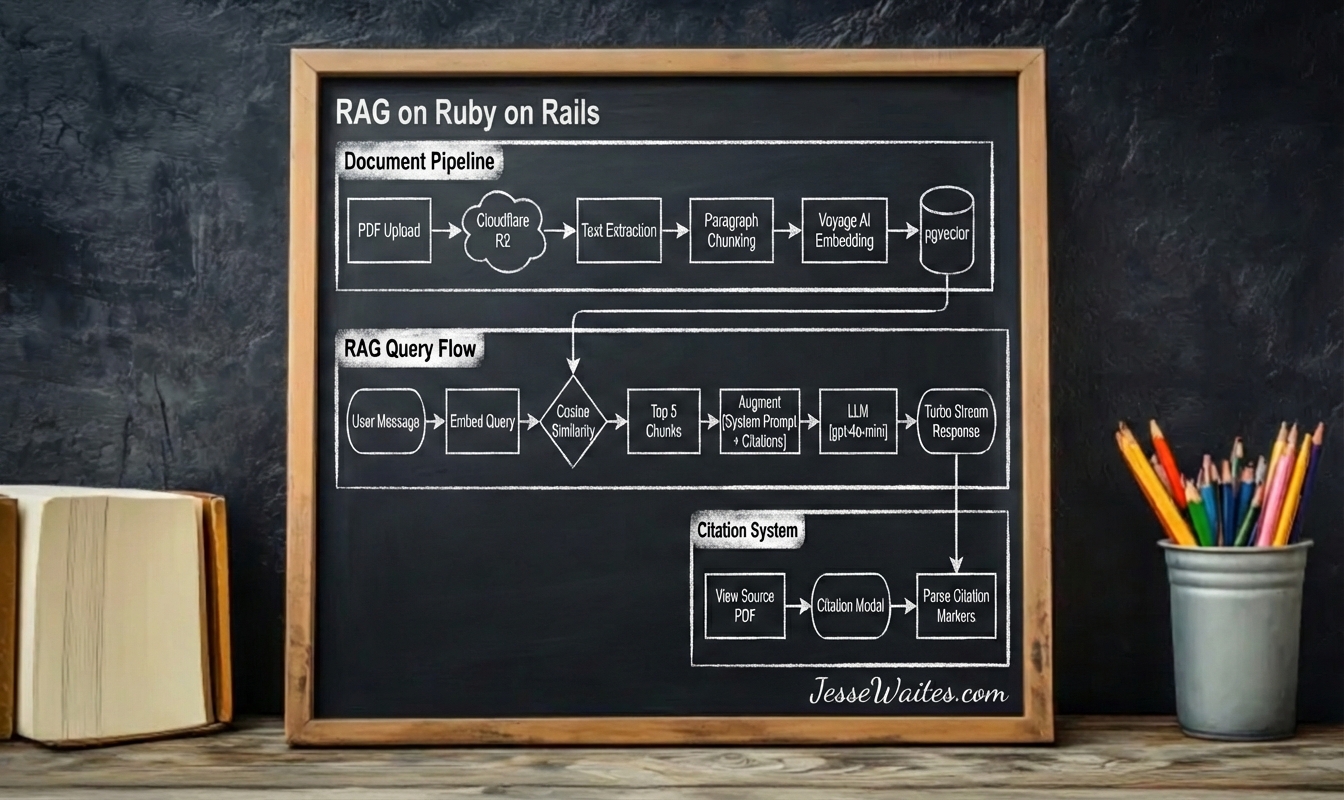
When a user uploads a PDF, the system executes a multi-stage pipeline in the background.
Storage: Active Storage sends the file to Cloudflare R2, an S3-compatible object store. This keeps large binary files out of the database while providing CDN-backed retrieval.
Text Extraction: The pdf-reader gem extracts raw text from each PDF page.
Chunking: In a RAG system, the data gets split into chunks. Rather than fixed-length splits, the chunker respects paragraph boundaries. It accumulates paragraphs until approaching ~500 tokens, then starts a new chunk. This preserves semantic coherence — a “chunk” about authentication won’t end mid-sentence with a sentance fragment like “the user must”
Embedding: Each chunk passes through Voyage AI’s voyage-3 model, returning a 1024-dimensional vector. Voyage specializes in retrieval embeddings, optimized for the similarity searches RAG requires.
Storage: The vectors land in document_chunks via the neighbor gem, which wraps pgvector’s indexing and similarity operations.
RAG Query Flow
When a user sends a message in the Rails UI, the system retrieves relevant context first efore calling the LLM.
Query Embedding: The user’s message gets embedded with the same Voyage AI model used for documents. This shared embedding space enables meaningful similarity comparisons.
Vector Search: pgvector performs cosine similarity search, returning the top 5 most relevant chunks. The neighbor gem makes this a single method call: DocumentChunk.nearest_neighbors(:embedding, query_vector, distance: "cosine").limit(5).
Prompt Augmentation: Retrieved chunks inject into the system prompt with citation markers: [1], [2], etc. The prompt instructs the LLM to reference these markers when using information from the context.
Streaming Response: The ruby_llm gem streams tokens as they generate. Each chunk broadcasts via Turbo Streams, giving users real-time feedback rather than waiting for complete responses.
Real-time Streaming
Chat responses stream to the browser without page refreshes or polling using Solid Cable. Rails 8 ships with Solid Cable, an Action Cable adapter backed by the database. This means no Redis server to maintain — the same PostgreSQL instance handles both data and pub/sub.
Three-phase Rendering:
- Scaffold: When a user submits a message, Turbo immediately appends an empty assistant message container
- Chunk Append: As LLM tokens arrive, each broadcasts a Turbo Stream that appends to the message content
- Final Replace: On completion, a final broadcast replaces the entire message with the processed version (including parsed citations)
This pattern prevents the jarring experience of waiting for AI responses while maintaining proper message structure for citations and formatting.
Citation System
Citations transform LLM responses from “trust me” to “here’s my source.”
Marker Parsing: The messages_helper scans response chunks for [1], [2] patterns. Each becomes a clickable button styled distinctly from surrounding text.
Modal Detail: Clicking a citation opens a Stimulus-driven modal. The citation_modal_controller fetches the chunk’s full text, document name, and page number via a simple endpoint.
Source Navigation: Each modal includes a “View Source Document” link pointing to the original PDF in R2. Users can verify the LLM’s interpretation against the actual source material.
The Zoom Pattern
I implemented a progressive information disclosure across three resolution levels:
- LLM Summary: The chat response synthesizes information, answering the user’s question directly
- Exact Chunk: Citation modals reveal the specific text passage the LLM referenced
- Full Document: Links to the source PDF provide complete context
This pattern respects user attention. Most queries resolve at level 1. Skeptical users can verify at level 2. Deep research reaches level 3. Each level requires explicit user action, keeping the default experience very clean.
Document Upload in the UI
I also built a small admin areas in the UI (accessible only to users with the admin flag set to true) where PDF documents can be uploaded for vector chunking. This feature exists because obviously do not want rando people feeding data into our AI system.
AI Implmentation
I went with the RubyLLM gem for this, it makes interfacing with AI models dead simple, and their documentation is great.
Corpus
I also built a /corpus index page where non-admin users can see the titles of the documents that have been uploaded into the system and can click through to view the source documents themselves. This provides transparency into what the system actually knows.
For example, if someone is looking for documentation on teaching an ice climbing course, a quick scan of the document titles will make it clear that no mountaineering materials have been uploaded yet. In that case, the user will know not to bother asking ice climbing questions in the chat interface.
I came up with this pattern on my own and I think it makes sense from an end-user perspective and helps set clear expectations about the system’s knowledge boundaries.
Conclusion
RAG doesn’t require a complex ML infrastructure, because Ruby On Rails and Postgres + PGVector provides everything needed: background jobs for pipeline processing, Active Record for vector storage, Action Cable for streaming, and a mature ecosystem of supporting gems!
pgvector brings vector search to the database you already run. Solid Queue/Cache/Cable eliminate Redis. Cloudflare R2 handles object storage at commodity prices.
The result: a production RAG system in a single Rails application, deployable anywhere Rails runs.
Get in touch if you ever want to chat about RAG on Ruby on Rails!